
Connect FireTMS
FireTMS is a modern transport management system. Once connected, Bobi manages orders, vehicles and contractors there on your behalf — always after your confirmation. You set the connection up once by pasting your personal API key.
Get your API key#
- Generate a key in FireTMSIn the FireTMS panel, generate a personal API key. Not sure where to find it? Check the FireTMS docs.
- Copy the keyCopy the generated key — you'll paste it into Bobi in a moment.
Paste the key into Bobi#
- Paste the keyPaste the copied key into the field. You can reveal it with the eye icon to check it pasted in full.
- Save the keyClick „Save key”. The „FireTMS” card then shows the „Key active” status — that means the connection is working.
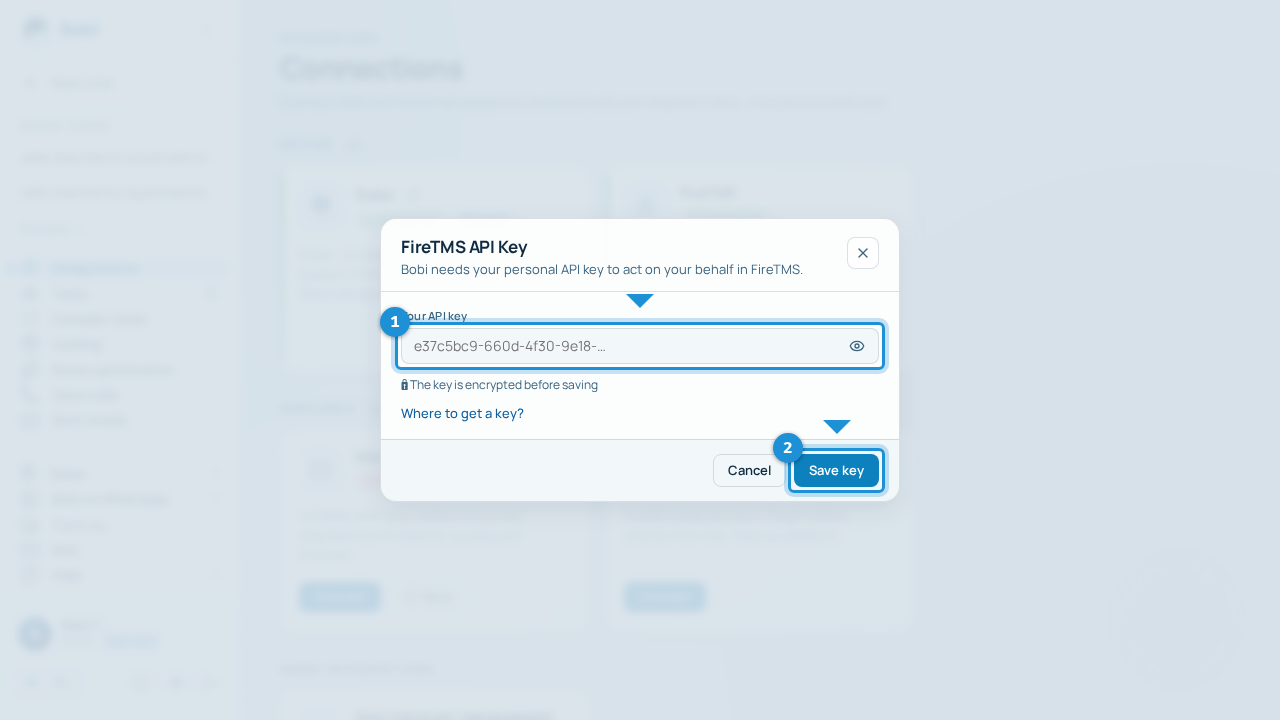
Your API key works like a password to FireTMS. Don't share it with anyone and don't send it in messages. Bobi encrypts it (🔒 nobody can see it), so once you've pasted it you can safely forget about it.
Set as Primary (optional)#
You can switch Bobi to FireTMS as your Primary transport management system — Bobi then creates and edits orders in FireTMS instead of Sokar. The freight exchange and email sync stay on Sokar. You can change this at any time.
Integration settings — including switching the primary system — can only be changed by the team owner or administrator.
What Bobi can do with FireTMS#
Once the key is connected, Bobi:
- creates and edits orders and transport offers in FireTMS,
- publishes offers on the Trans.eu exchange and keeps them up to date,
- syncs your mail to catch confirmations, quotes and invoices,
- browses your fleet (vehicles and resources).
What Bobi doesn't do in FireTMS: it doesn't change order statuses and doesn't manage documents through the API — do those directly in FireTMS.
If more than 30 days have passed since you added the key, Bobi reminds you with a warning icon on the „FireTMS” card. Check whether the key still works and paste a new one if needed.