
Finding your way around
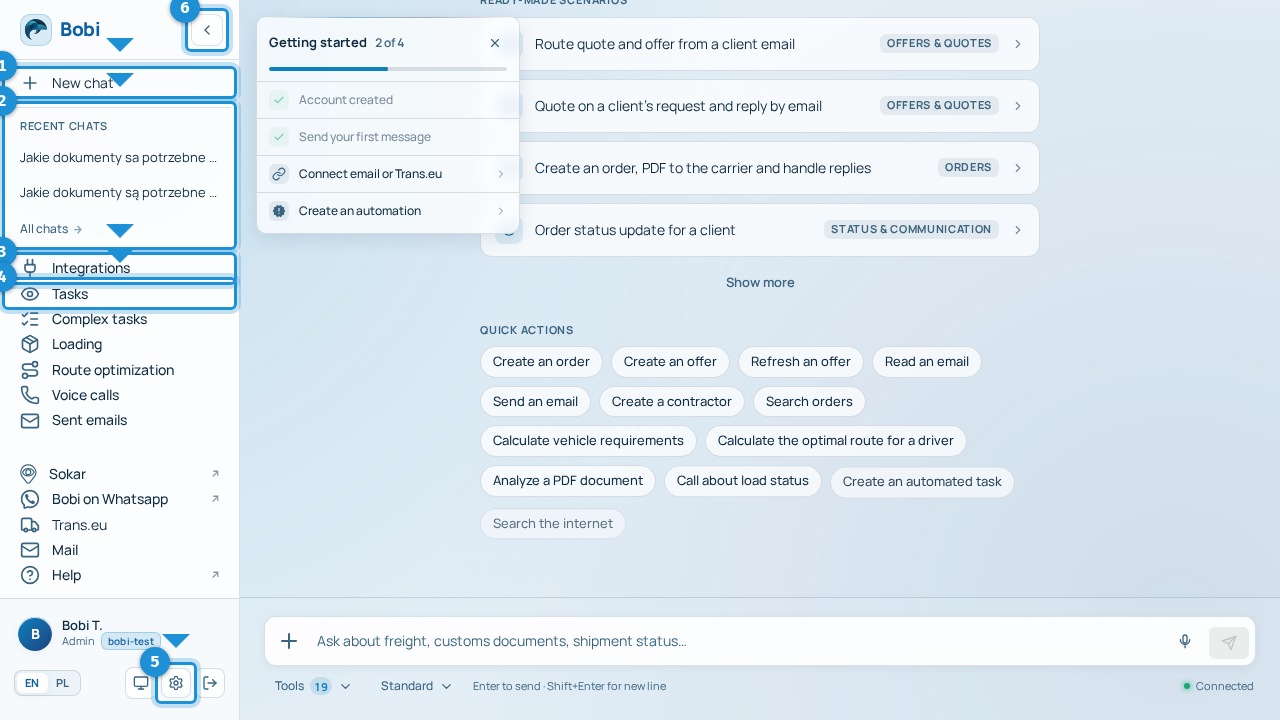
The conversation window in the middle is your main workspace — this is where you talk to Bobi. On the left is the sidebar with navigation: jump to tasks, integrations and settings, and return to earlier conversations. Below we walk through the sidebar number by number.
The sidebar step by step#
- New chatAt the top of the sidebar you start a new conversation with Bobi. Every new matter is a new chat.
- Collapse / expand sidebarThe toggle collapses the sidebar to icons only (and expands it again) when you want more room for the conversation.
Section → what it does#
| Section | What it does |
|---|---|
| New chat | Starts a new conversation with Bobi. |
| Recent chats · All chats | Your five latest threads; “All chats” opens the full history. |
| Integrations | Connected data sources (email, freight exchange and more). |
| Tasks | Matters watched in the background on a schedule. |
| Complex tasks | Longer, multi-step jobs Bobi runs for you. |
| Shortcuts to connected tools | Below the divider: quick links to the tools connected to your account. |
| Settings | Account, team and roles, plan and billing, appearance and notifications. |
First run
New accounts get a short welcome wizard (welcome → connect a source → purpose), and an empty chat shows a “First steps” card with a checklist: account → first message → integration → automation.