
Proposals and approvals
Before Bobi sends or changes anything, it can first show you a proposal and wait for your approval. This page explains the difference between asking for approval and acting on its own, shows how to handle a proposal, and how much time you have to decide.
Two modes#
Every task runs in one of two modes, which you set with the “Ask before running” toggle in the builder:
- Propose (safe, default) — Bobi prepares a proposal and does nothing until you click “Accept”. In this mode Bobi only uses tools that don't change data — the write itself happens only after your approval.
- Run automatically — Bobi performs the set action on its own, without asking. Keep this mode for routine you already know and trust.
The proposal lifecycle#
A proposal ends in one of four final states, depending on your decision (or the lack of one):
graph TD; P[Pending] --> A[Accepted]; P --> R[Rejected]; P --> E[Expired]; P --> S[Superseded]
- Pending — Bobi has prepared a proposal and is waiting for your decision.
- Accepted — you clicked “Accept”; Bobi performs the proposed action.
- Rejected — you clicked “Reject”; nothing happens (you can add a comment).
- Expired — the time to decide ran out; the proposal is dropped and nothing happens.
- Superseded — Bobi prepared a newer proposal that takes the place of the previous one.
Handling a proposal#
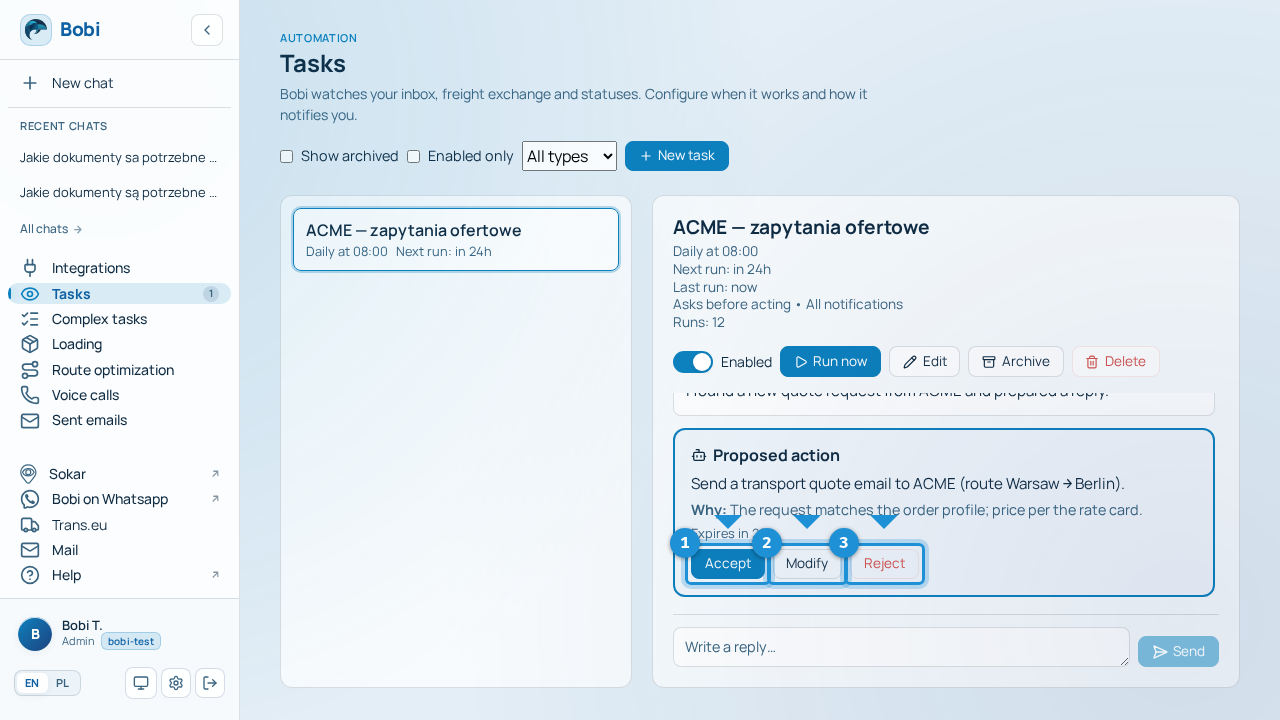
- Find the proposalBobi flags it with a badge next to “Tasks” in the side menu and in the task's own thread.
- Read what Bobi proposesYou'll see exactly what action Bobi wants to take before anything happens.
- DecideClick Accept (Bobi performs the action), Modify (write what to change) or Reject (comment optional).
How long you have to decide#
Every proposal has a time to decide (TTL). By default it's 24 hours, and in the task builder you set it anywhere from 1 to 168 hours (up to 7 days). As the deadline nears, the counter on the proposal is highlighted. Once the time is up the proposal expires — nothing happens, and Bobi may prepare a new one the next time the task runs.
Notifications#
For each task you choose how loudly Bobi should tell you about proposals:
- All — a notification for every proposal.
- Urgent only (default) — notifications only for matters that need attention.
- Silent — no notifications; you check proposals yourself in the inbox next to “Tasks”.